Announcements

All the updates to make your experience with us even that much better!

  1. May 2026 Release Notes

    Overview

    This month's release brings improvements and important bug fixes to enhance your experience.

    πŸš€ New Features

    • AI Image Editor: You can now edit your ad images using AI tools directly within the single ad creation flow.
    • Video Progress Alerts: You can now receive a clear notification when your video ad has finished processing, making it easier to know exactly when your content is ready to use.
    • Ad Score Insights: You can now instantly view your ad's performance score and a detailed report through a clean pop-up, making it easier to understand how your ads are doing at a glance.
    • Manage Ad Opt-Outs: You can now easily opt out of specific ad experiences, giving you more control over how your ads are managed and delivered.

    πŸ”¨ Improvements

    • Smoother Platform Experience: We updated key parts of Rocketeer's connection with Facebook to keep everything running reliably behind the scenes. You'll continue enjoying a seamless ad creation experience without any interruptions.
    • Optimized Ad Image Sizes: Your ads now automatically use the best image dimensions for Facebook, helping them look great and perform better across all placements.
    • Smoother Meta Connection: We improved how Rocketeer handles issues with your Meta account, so you'll experience fewer interruptions when creating and managing your ads.
    • Larger File Uploads: You can now upload files up to 4GB, giving you the freedom to work with higher-quality videos and large creative assets without limitations.
    • Smarter Ad Recommendations: We enhanced how Rocketeer surfaces its top ad recommendations, so the most impactful suggestion always rises to the top and stays front and center. You'll spend less time sorting through options and more time launching ads that perform.
    • Smarter Image Editing: We upgraded the AI behind the Image Editor to deliver sharper, more accurate results when creating and refining visuals for your ads.
    • Faster Website Scanning: We improved how Rocketeer reads and saves information from your website, so your ad content is pulled more accurately and reliably.
    • Smarter Image Generation: We upgraded the technology behind ad image creation to deliver higher-quality visuals for your Facebook ads. You'll notice improved results when Rocketeer generates images as part of your ad creation process.

    🐞 Bug Fixes

    • Stable Login Sessions: We fixed an issue that was unexpectedly signing you out during billing-related updates. You'll now stay logged in without any unwanted interruptions.
    • Login Issue Fixed: We resolved an issue that prevented you from logging in when a connected Facebook page had been deleted.
    • Smoother App Experience: We resolved several issues that were causing unexpected errors within the app. Things should now run more smoothly as you create and manage your Facebook ads.
    • AI Ad Creation Fix: We resolved an issue that was occasionally disrupting the AI-powered ad creation process. Your ads should now generate more smoothly and reliably.
    • EU Audience Targeting: We fixed an issue that was preventing you from correctly targeting audiences in the European Union.

    ➑️ Up Next

    Comments

  2. BIG UPDATE! Rocketeer now tells you exactly what to do with your ads!

    New Feature

    We just shipped the most significant update to Rocketeer since launch. The entire analytics experience has been rebuilt from the ground up. No more jumping between tabs, no more guessing what to do next. For the first time, Rocketeer doesn't just show you what's happening with your ads, it tells you exactly what to do about it.

    What's new

    • All-in-one Analytics Tree: Your entire campaign hierarchy starting with campaign β†’ audience β†’ ads, now lives in a single zoomable, scrollable grid. No more clicking between tabs like traditional ad managers.
    • AI Performance Scores: When an ad exits its testing phase, Rocketeer scores it and delivers a verdict: Top Performer, Above Average, Average, or Below Average so you always know where you stand.
    • Gamified Results Reveal: Viewing your ad results is now an experience. Results animate in like a slot machine so you actually feel the win or the cut.
    • Exact Next-Step Recommendations: Rocketeer doesn't just score your ad, it tells you precisely what to do. Run it 3 more days, kill it, scale it. No more flying blind or guessing your next move.
    • Kill & Replace Flow: When an ad is underperforming, Rocketeer calls it out and walks you straight into creating a replacement so you stop bleeding budget on ads that aren't working.
    • Cleaner Dashboard: The main dashboard has been simplified to show only what matters: your active campaigns and their core stats. Less noise, faster decisions.

    3

    Comments

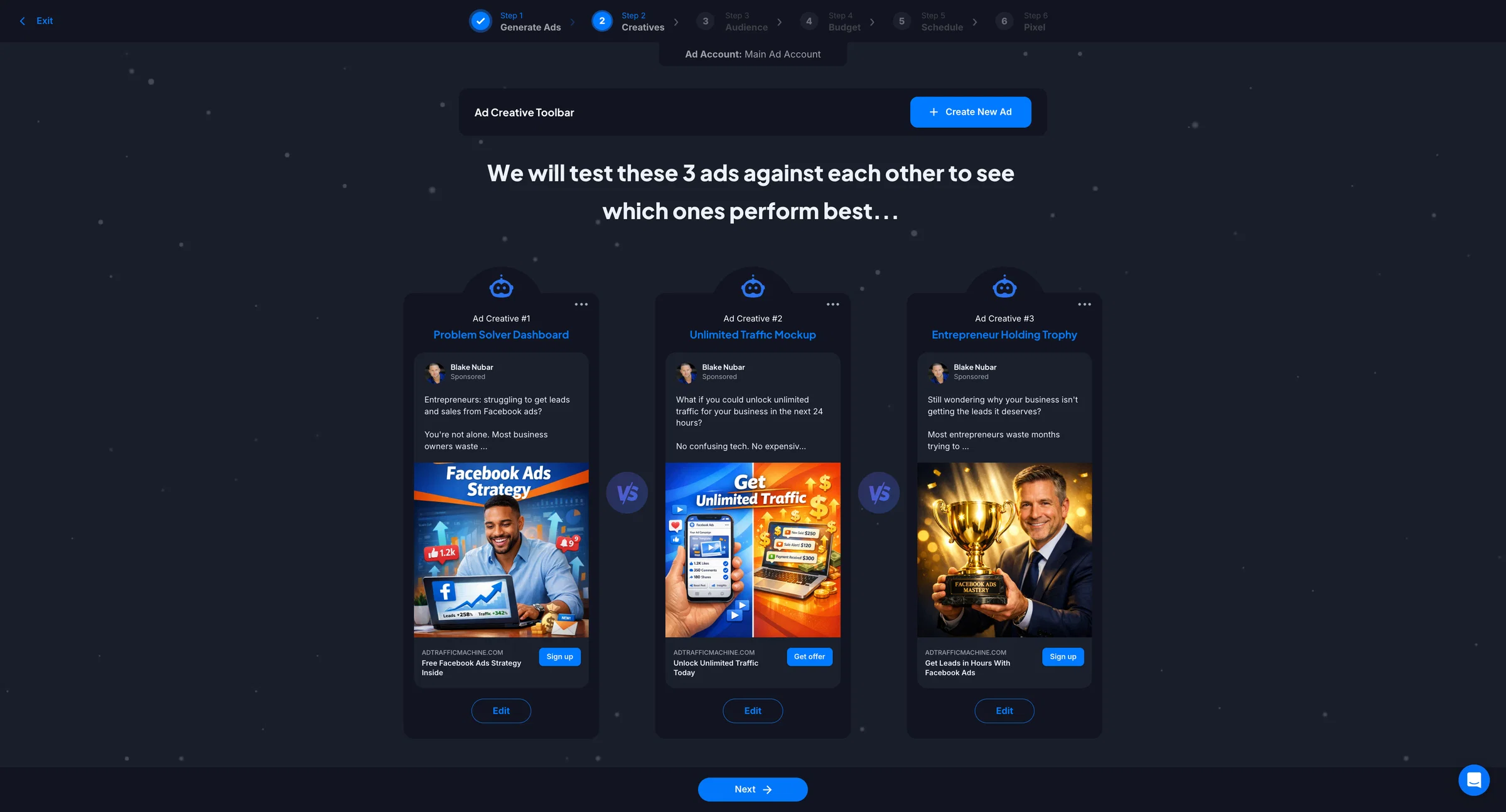
  3. Introducing Smarter Ad Images Built to Convert

    Improvement

    Overview

    If you've ever felt like your ad images were almost there but not quite landing the way you hoped, that changes today. We've completely overhauled Rocketeer's image generation engine, and the difference is night and day. The visuals it produces now are sharper, more scroll-stopping, and built with direct response principles baked in so every image isn't just pretty, it's designed to drive clicks and conversions.


    Ad Images

    Here's what that means for you:

    • Images that actually stop the scroll: Our redesigned image generator now produces visuals that grab attention in the feed, so your ads compete with the best creative out there and not just to blend in.
    • Better creative, better conversions: Stronger ad images mean more clicks, more leads, and more sales. This upgrade is designed to move the needle on your results, not just your aesthetics.
    • Pro-level visuals without a designer: You don't need a creative team or a Canva subscription. Rocketeer now generates images that look like they came from a seasoned graphic designer, in seconds.
    • Built for Facebook's feed, not just any feed: Every image is optimized for the way people scroll and engage on Facebook, giving your ads the best possible shot at driving action.

    2

    Comments

  4. April 2026 Release Notes

    Overview

    This month's release brings new features, improvements, and important bug fixes to enhance your experience.

    πŸš€ New Features

    • You can now edit your ad's image directly within the AI builder, making it easier than ever to fine-tune your visuals without leaving the creation flow.

    πŸ”¨ Improvements

    • We improved the video creation experience in the AI Builder, making it easier and more seamless to review and manage your video ads in one place.
    • You can now see a clear explanation when one of your ads gets rejected, so you always know what went wrong and what to do next.
    • We optimized the reliability and performance of website content extraction, so Rocketeer can more accurately pull information from your landing pages when creating ads.
    • We added to the Audience step in the AI Builder to make it easier for you to define and refine who sees your ads.
    • We modified the Custom Audience setup by removing the pre-filled default country list, giving you a blank slate to select only the locations that matter to your campaign.
    • We updated the ad creation experience so that your selected images and videos are now saved automatically as soon as you choose them, keeping your work intact until you're ready to make a change.
    • We improved the reliability of ad image loading to ensure your visuals appear faster and more consistently across your campaigns.
    • You can now see your ads update in real time as they move through different stages, from draft to active to paused, so you always know exactly where each ad stands.

    🐞 Bug Fixes

    • We fixed an issue that could cause your Meta analytics data to fail syncing correctly, ensuring your ad performance insights load more reliably.
    • We fixed several issues in the AI Ad Builder to make your ad creation experience smoother and more reliable.

    ➑️ Up Next

    Comments

  5. Edit Any Image With AI

    New Feature
    Announcement

    Introducing a new way to edit your ad visuals!

    Comments

  6. March Release Notes

    Release Notes

    Overview

    This month's release brings improvements and important bug fixes to enhance your experience.


    πŸ”¨ Improvements

    • Rocketeer AI Targeting: We've updated how our AI audience targeting works to better locate your ideal customer.
    • Media Modal: Uploading and selecting the visual for your ad become much easier. With this improvement you can now easily select previous ad images and videos and reuse them on new creative ideas you have.
    • Realtime Analytic Updates: We pull data in real time so the moment we get new stats you will know.
    • Stat Changes: Made updates to what stats are best to show on certain ads you have running.
    • User Feedback: Added toast notifications to reconfirm that your changes have been saved.

    🐞 Bug Fixes

    • Minor bugs squashed throughout Rocketeer to make your experience even more seamless!

    ➑️ Up Next

    Comments

  7. February Release Notes

    Release Notes

    Overview

    This month's release brings new features, improvements and important bug fixes to enhance your experience.


    πŸš€ New Features

    • AI Builder Has Landed: Create campaigns in seconds with our brand-new AI Builder. Tell it what you want, and watch as it crafts converting ads while you sip your coffee. The future is lazy, and we're here for it!
    • Welcome to the Dark Side: Rocketeer now rocks a sleek Dark Mode by default! Easier on your eyes, harder on boring ads. Your late-night creative sessions just got a whole lot cooler.
    • New Visual Style Concepts: Stuck in a creative rut? Not sure what type of ad to create? Now you can choose from one of our many visual style concepts to instantly create an ad for your offer.

    πŸ”¨ Improvements

    • Smoother AI Builder Navigation: We've polished up the header navigation in our AI builder to make jumping between features as smooth as your best ad performance.
    • Ad Name Editor in AI Builder: Now you can customize your ad names directly in the AI builder, because sometimes "Campaign_001" just doesn't capture your creative genius.
    • Crystal Clear Text on Light Backgrounds: Say goodbye to squinting at your screen! We've boosted text readability so you can focus on crafting killer campaigns, not decoding what's on your monitor.
    • Seamless Design Experience: We've made the template builder experience consistent across all pages. Whether you're in the regular builder, analytics, or the new AI builder, everything works the same way. Less learning, more creating!
    • Fort Knox-Level Chat: We've beefed up security on our Intercom integration. Your conversations and data are now locked down tighter than your ex's Instagram after the breakup. Your security is our priority (but we're more fun about it).
    • Cleaner AI Builder Layout: Fixed those pesky text alignment issues that were making our AI builder look a little wonky. Now everything lines up perfectly, just like your targeting should.
    • Better Text Flow in Ads: Your ad copy now wraps beautifully without awkward breaks or cutoffs…because every word in your ads should look as good as it converts.
    • Smarter Meta Error Messages: When things go sideways with Meta, you'll get clearer, more helpful error messages that actually tell you what's happening and how to fix it.

    🐞 Bug Fixes

    • Minor bugs squashed throughout Rocketeer to make your experience even more seamless!

    ➑️ Up Next

    Comments

  8. October Release Notes

    Release Notes

    Overview

    This month's release brings improvements and important bug fixes to enhance your experience.


    πŸš€ New Features

    • CAPI: Meet the Connect API (CAPI)! It's our newest tool that ensures your ads are tracking accurately so Rocketeer can make better decisions on your behalf!
    • Ad Account & Page Picker Screens: We've launched sleek new screens to help you find accounts and pages in a snap. You can also view this information in your settings

    πŸ”¨ Improvements

    • Meta Reconnect: When you need to reconnect to meta you can do so in one click.
    • Friendlier Error Messages: Nobody likes errors, but when they happen, you'll now know exactly what's up. Our messages are clearer and more helpful, so you can fix issues fast and keep moving forward.
    • New Performance Algorithm Ranking System: We've supercharged our ad performance! Our latest algorithm ranks performance data with mind-blowing accuracy. Make smarter decisions faster with insights you can trust.

    ➑️ Up Next

    Comments

  9. Your Ads Just Got Smarter! πŸ€“

    New Feature
    Announcement

    Introducing Ad Tracking (Meta CAPI) to supercharge your ad performance!

    1

    Ad Tracking (Meta CAPI)

    Track the success of your ads using CAPI. This allows more accurate reporting of results!

    Blake Nubar
    Shipped πŸš€

    0

    Ad Tracking with Meta Conversions API

    This helps Rocketeer tell Meta when important things happen on your site, like generating a lead or purchase. It does this from our servers, not just the pixel in the browser. The result is clearer tracking and smarter ad delivery.

    What This Means For You Ads

    • Rocketeer hears about your leads and sales more reliably
    • Tracking works better on iPhone and when cookies are blocked
    • Your ads learn faster, so they can find the right people without wasting any budget
    • Rocketeer can make smarter recommendations resulting in improved ad performance

    How It Works

    1. Activate your tracking from your Ad Performance screen inside of Rocketeer
    2. Copy the ad tracking code and paste it into the header of your website
    3. Select which goals you want to track (leads, purchases, etc...)
    4. Test goal(s) and confirm your tracking!

    Comments